Media Kit
Resources for sharing Ona Pass accurately.
Whether you’re writing an article, preparing a conference presentation, evaluating a pilot, or introducing Ona Pass to your organization, these resources are intended to make that process simple.
About Ona Pass
Approved descriptions for articles, presentations, and introductions. Each version adds detail while staying consistent.
30-second description
Ona Pass is digital hall pass and Managed Rooms software for schools. Teachers & Staff create and manage passes on a Staff Notebook; administrators see live student movement and supervised spaces on a Campus Clipboard.
2-minute description
Ona Pass is browser-based software designed around how schools actually work. Teachers & Staff use a Staff Notebook—a single page with a hall pass sheet, sticky notes for students currently out, and an inbox for inbound passes. Administrators use a Campus Clipboard for live visibility into hall passes and Managed Rooms across the building.
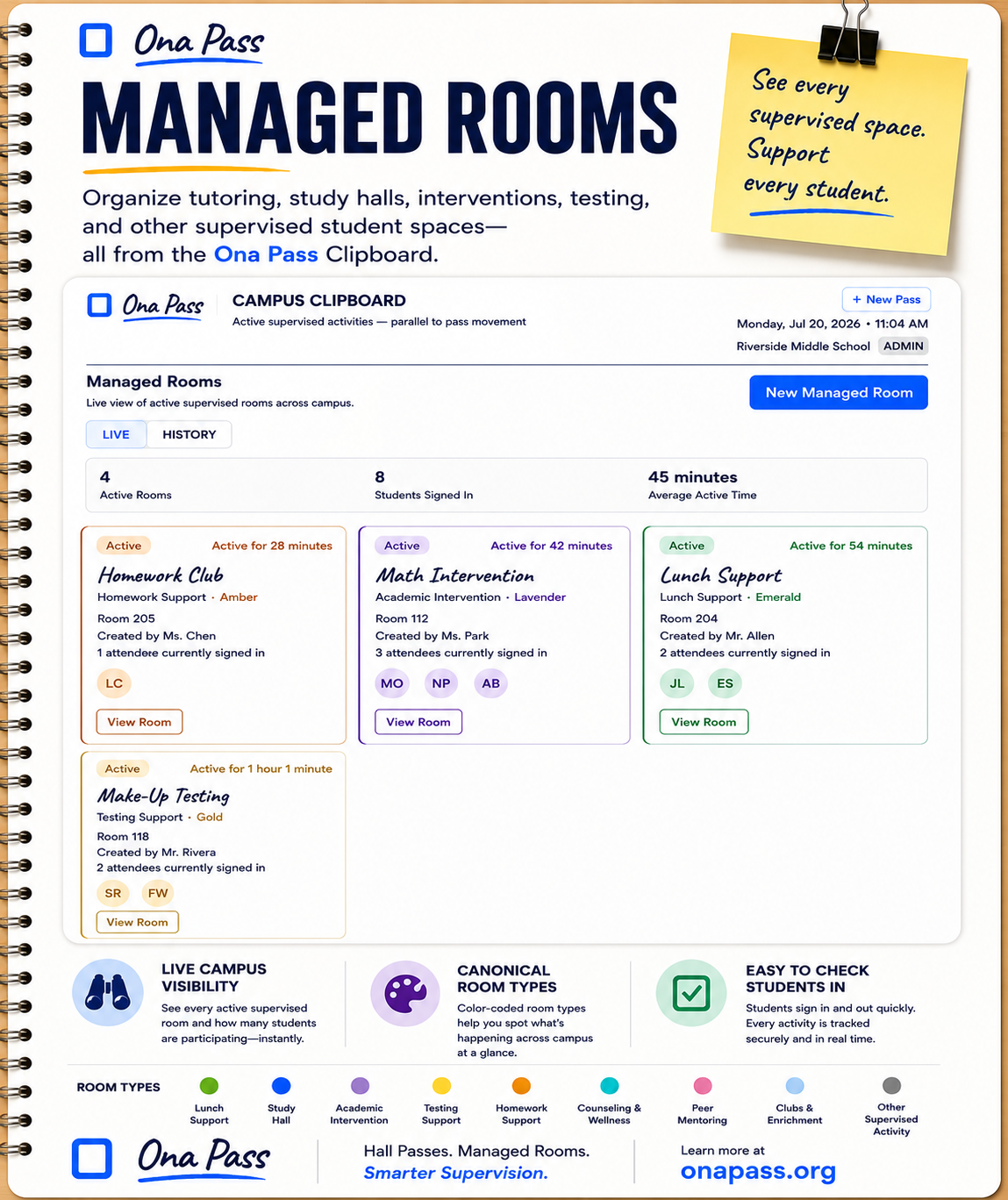
Managed Rooms helps a school, district, or LEA (Local Education Agency) organize tutoring, study halls, interventions, testing, counseling, clubs, and other supervised student spaces from the same Clipboard. The product is built to protect instructional time: pass creation takes about five seconds, primary training takes about four minutes, and there is no classroom installation for a pilot. Schools typically begin with a focused pilot of about ten staff before considering broader adoption.
Full description
Ona Pass is digital hall pass and Managed Rooms software for K–12 schools. It replaces fragmented paper passes and ad hoc spreadsheets with a calm, focused workflow that respects how Teachers & Staff already manage student movement and supervised spaces.
The Staff Notebook gives classroom and support staff one working page: a New Pass sheet for creating passes in seconds, Currently Out sticky notes for at-a-glance visibility, Passes To You for inbound students, and a Today’s Log when history matters. The Campus Clipboard gives administrators a live view of campus activity, Managed Rooms, staff directory, and configuration—without asking teachers to file reports.
Ona Pass runs in modern web browsers. A typical school pilot includes up to ten staff, minimal IT involvement, and documentation-led onboarding. The product is intentionally scoped: it does not attempt to be a full student information system or behavior platform. Schools evaluate through real use, then decide whether to expand based on evidence from their own building.
Ona Pass is developed with a philosophy of thoughtful restraint—protecting instructional time, earning every feature, and keeping the primary workflow visible rather than buried in menus.
Quick Facts
| Product | Ona Pass — digital hall pass and Managed Rooms software for schools |
|---|---|
| Purpose | Help schools manage student movement and supervised spaces with a simple staff workflow and live administrative visibility |
| Primary audience | Teachers & Staff, Administrators, Student Services, IT, Purchasing / Business Services, District / LEA Leadership |
| Deployment | Cloud-based; modern web browsers; no local classroom install for pilot |
| Pilot approach | Focused school pilot — typically up to ten staff — before broader adoption |
| Website | onapass.org |
| Contact | Contact Us — select or write “Media inquiry” for press requests |
Why we built Ona Pass.
We didn’t build another student management platform.
We built the hall pass Teachers & Staff actually want to use.
Most movement software grows by adding dashboards, reports, and configuration layers until the everyday task—send a student to the nurse, the restroom, or the office—requires navigating something that feels like enterprise software. We spent an unusual amount of time deciding what not to build.
Ona Pass protects instructional time by keeping pass creation on one page, visible in seconds. It respects educators by using familiar objects—a hall pass sheet, sticky notes, a clipboard—rather than asking staff to learn a new software language. Every feature has to earn its place in the primary workflow. If it competes with creating a pass or seeing who is out, it does not belong on the Staff Notebook.
That restraint is intentional. Thoughtful software, in our view, is software schools can evaluate honestly through a small pilot—and expand only when the workflow proves itself in real classrooms.
Available resources
Download logos, brand guidance, screenshots, and product information for articles, presentations, and partner conversations.
- Logos Download Logo Package — transparent PNG with usage notes.
- Brand guide View Brand Guidelines — logo use, colors, typography, and screenshot guidance. See also Using the Ona Pass brand below.
- Screenshots Download Approved Screenshots — current Staff Notebook and Campus Clipboard captures with captions.
- Product walkthrough Watch a one-minute walkthrough of Ona Pass, from creating a pass through return and completion. Watch the Product Walkthrough
- Fact sheet Download the Ona Pass Fact Sheet — one-page overview for journalists and school leaders. Print or save as PDF from your browser.
- Managed Rooms poster Download the Managed Rooms Product Poster — approved v1.2 master for conferences, pilot packets, and presentations. Print-ready Letter, A4, and 11×17 exports may follow later.
- Pilot overview View the Pilot Program — focused evaluation with about ten staff, trial keys, and a two-to-four-week window before any wider commitment.
- Press contact Contact Ona Pass — select or write “Media inquiry” in your message.
Featured In
Organizations we’re introducing Ona Pass to. This is not a list of publications, endorsements, or confirmed coverage.
We’re beginning conversations with educational organizations and publications.
- ISTE
- FETC
- Tech & Learning
- District Administration
- eSchool News
- THE Journal
- AASA
- NASSP
- EdSurge
- CUE
Using the Ona Pass brand
When referencing Ona Pass in articles, presentations, or partner materials, please use approved assets and accurate product descriptions from this page.
- Use the official Ona Pass logo — do not recreate or approximate the mark.
- Do not alter logo colors or apply unapproved color treatments.
- Maintain clear spacing around the logo; do not crowd it with other elements.
- Do not stretch, skew, or rotate the logo.
Media & partnership inquiries
Conference organizers, journalists, podcast hosts, pilot schools, education partners, and district teams are welcome to reach out. We respond to requests for accurate product information, interview scheduling, and partnership conversations.
Media and general inquiries: Contact Us — select or write “Media inquiry” so we can route your request appropriately.
Design note
Thank you for helping tell our story accurately.
Every article, presentation, and conversation shapes how schools understand Ona Pass.
We appreciate the opportunity to share thoughtful, accurate information that respects educators and the work they do every day.